
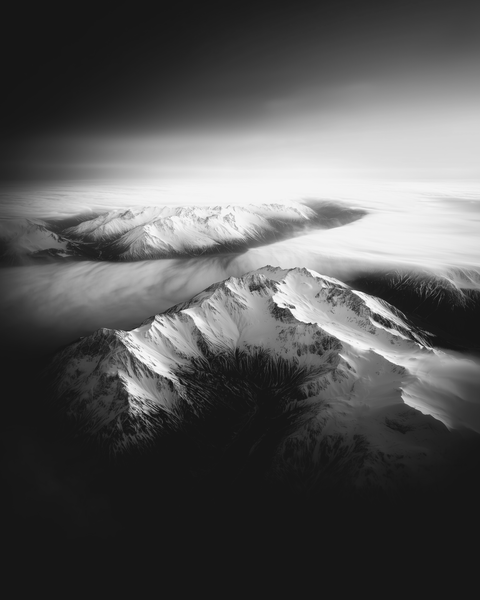
Cinematic Drone Shots: Elevate Your Travel, Wildlife, and Landscape Films
Your drone glides over a misty forest at dawn and a hidden valley opens up as the light spills over the horizon. In one shot, you've set the scene and pulled your audience in. That's what good drone work does. For creators making travel, wildlife, and landscape films, aerials aren't just nice to look at — they add drama, scale, and emotion to a story. Drones reach perspectives that used to need a helicopter, so even a solo creator can film sweeping landscapes, wildlife on the move, or a travel sequence with real cinematic weight. But getting there takes more than flying high. This guide covers the core drone techniques, how to use them in a story, and the gear that helps. Used with intent, a few short aerial shots can carry a lot, so let's get the moves right.
Why Cinematic Drone Shots Elevate Storytelling
In travel and wildlife content, how you show a scene matters as much as what you show. Aerial shots give you things a ground camera can't. They create a real sense of scale — a tiny safari jeep in a vast savannah, a lone hiker dwarfed by mountains. They let the camera float through a space in long tracking shots or fly-overs that put the viewer inside the environment. And with the right move, you can stage a reveal, building a little tension as the camera rises or rounds a corner to show something striking.
Travel marketing and nature documentaries lean heavily on aerial footage to capture landscapes and cover wildlife habitats or travel sequences. Done well, these shots don't just look good; they move the story along. A drone shot can set context, show scale, or hint at what's coming. The sense of perspective is hard to get any other way, and used with care it lifts the whole film. The key is intent: every aerial should do a job, whether that's setting the scene, following the action, or carrying a mood.
Essential Cinematic Drone Shot Techniques
Here are the core drone shots that make up cinematic aerial storytelling. Each has its own look and its own job in a story, and learning them gives you more to work with from the air. Smooth piloting and deliberate pacing are usually what separate an amateur clip from a shot that holds a viewer.
The Reveal Shot – Establishing the Scene
The reveal shot uses the drone's motion to uncover something new in the frame. You might push forward to suddenly show a big vista, or climb to lift the camera above something blocking the view in the foreground. It works because it builds curiosity and then pays it off in one smooth move.
Plan where you start hidden (behind trees, buildings, cliffs) and where you end (the big view). Use gentle stick inputs or your drone's "Cine" mode for slow, controlled movement. Golden hour light often adds to the drama of a reveal.
- Story use: Builds anticipation and provides context. Ideal for setting the stage at the beginning of a video or transitioning to a new location.
- Example: Ascend above a rainforest canopy to unveil a hidden waterfall, or push forward through a canyon arch to reveal a vast desert.
- Technical tip: Mind changing light levels. ND filters help maintain proper shutter speed when transitioning from shadow to bright light.
Pro Tip: Always scout your path at low speed for obstacles like wires or branches. Even if your drone has obstacle sensors, manual verification is safer. Plan your exact start and end frames so the reveal has maximum impact.
The Orbit Shot – 360° Focus on Your Subject
The orbit shot flies the drone in a circle around the subject, keeping the camera centered on it. You get a 360° view that works well for hero moments or a strong subject highlight. As the background spins behind your subject, the parallax adds depth and a sense of scale.
Orbits are popular in travel and adventure films — circling a hiker on a mountain to show the panorama behind them, for instance. With wildlife, orbiting at a respectful distance places an animal within its environment. Keep the orbit slow and steady for the most cinematic effect. Some drones have an automated "Point of Interest" mode that holds a clean circle for you.
- Story use: Showcases your subject with full context, excellent for “hero” moments or landmark reveals.
- Example: Orbit a lone hiker on a summit, gradually revealing the entire mountain range, or circle a historic fortress on a hill.
- Technical tip: Manual orbits require subtle stick coordination. If available, use a built-in orbit feature to ensure a stable circular path. Keep radius consistent and go slow for smooth footage.
Pro Tip: To enhance an orbit’s cinematic feel, lower the yaw sensitivity in your drone’s settings. Consider speed-ramping in post-production if your raw orbit feels too fast.
The Tracking Shot – Follow the Journey
A tracking shot follows a moving subject — from behind (follow), in front (lead), or alongside (parallel). It's great for showing action, progress, or a journey, putting the viewer inside the motion of a scene. A drone can follow vehicles, wildlife, or people, turning a simple walk or drive into something with real momentum.
Manual tracking takes solid flight skills to hold framing and dodge obstacles. Automated modes like ActiveTrack help solo creators, but stay ready to take over if the subject moves unpredictably. Consistent speed and altitude relative to the subject keep the shot smooth. A lower angle feels more intimate and fast; a higher one shows more of the surroundings.
- Story use: Highlights movement and progress — ideal for journeys, travel vlogs, sports, or wildlife pursuits.
- Example: Following a safari jeep at sunset, or leading a travel host walking through a village, capturing their anticipation.
- Technical tip: Plan the subject’s route, rehearse if possible, and shoot at a higher frame rate (60fps) if you want the option of slow-motion in post.
Pro Tip: Vary your shots (behind, front, side) for editing flexibility. If filming wildlife, keep a safe distance and watch for any signs of disturbance.
The Top-Down Shot – Bird’s-Eye Perspective
In a top-down shot, the camera points straight down for a bird's-eye view. This angle often reveals patterns, textures, or shapes you'd never see from the side, and it can turn an ordinary scene into something worth watching. It's good for showing the layout of a landscape or the swirl of a busy marketplace.
Top-down angles also feel a bit detached, like you're looking down on the world from above. That can work well for showing how small a subject is in a big environment, or for moving between scenes with a striking overhead shot.
- Story use: Provides context or scale, can serve as an establishing or transition shot.
- Example: Overhead of a winding road through autumn foliage, or the symmetrical layout of a historic city’s streets.
- Technical tip: Stability is key; even slight drifting is obvious in a top-down. Use calm weather, a stable hover, and consider locking exposure if moving from dark to light areas.
Pro Tip: Look for patterns that reinforce your story’s theme: an empty road signifying solitude, animal tracks for migration, or geometric fields for agricultural contexts.
The “Dronie” – Epic Selfie Pull-Out
The “dronie” is basically a drone selfie, but used well it's more than a gimmick. The classic version: start close on the subject, then fly backward and up to reveal the surroundings. It can be a fun intro shot ("here I am") or a closing shot that pulls back to show everything behind you.
Many modern drones have a QuickShot or automated mode for dronies. If you do it manually, check for obstacles behind the drone. A slow pull-out usually feels more epic than a fast one, since it gives the environment time to open up on screen.
- Story use: Effective as an intro/outro or to demonstrate scale (the subject becomes tiny against a grand backdrop).
- Example: Pulling away from you on a cliff at sunset, revealing an expansive coastline, or from a city square to the entire skyline.
- Technical tip: Keep the camera locked on the subject as long as possible. QuickShots can be fast; consider manual control if you want a slower, more majestic reveal.
Pro Tip: Bookend your video with a dronie at the start and end for cohesive storytelling. Slowing down the pull-out can intensify the sense of wonder.
Fly-Throughs and FPV Dives – Adrenaline-Packed Moves
If you want more energy, there are fly-throughs and FPV dives. Fly-throughs thread the drone through a narrow gap — an arch, dense forest, a temple doorway — for an immersive POV. FPV dives are a steep, fast descent down a cliff or waterfall, with a rollercoaster feel.
Both usually need an FPV drone or solid piloting skills. They add a jolt of excitement to travel or wildlife films, but use them safely and sparingly so they don't overwhelm the audience or wreck your gear.
- Story use: High-impact shots for action sequences or attention-grabbing transitions.
- Example: Zooming through a rock arch to reveal a hidden lake, or diving down a canyon in sync with fast-paced music.
- Technical tip: High frame rates (e.g., 60fps) help handle fast motion, and post-stabilization is often necessary. Always practice flight paths slowly first.
Pro Tip: Start with small, controlled fly-throughs (like under a bridge) before attempting complex ones (like a cave or tight indoor space). FPV dives require altitude for recovery and skillful throttle management.
The Dolly Zoom – Vertigo Effect from Above
The dolly zoom, or "Vertigo effect," moves the drone forward or backward while zooming the lens the opposite way. The subject stays roughly the same size in the frame while the background warps, for a surreal, dramatic look. It used to need a camera dolly; drones with optical zoom now make it possible in the air.
Use it sparingly, for moments of sudden realization, shock, or awe. It amplifies the emotional weight of a scene, but overuse it and it starts to feel like a trick. If your drone has no optical zoom, you can try something similar in post by keyframing a digital zoom on high-resolution footage, though results vary.
- Story use: Conveys intense emotion or grand revelation.
- Example: A subject standing at the edge of a vast canyon, the background stretching dramatically as the drone zooms in and flies backward.
- Technical tip: Lock exposure to avoid flicker or aperture changes during zoom. Two-person control (pilot + camera operator) can help sync movement and zoom more precisely.
Pro Tip: Accompany a dolly zoom with sound design—like a dramatic beat drop—to maximize its psychological effect.
Summary of Cinematic Drone Shot Types
| Drone Shot Type | Difficulty | Best Uses | Execution Tips / Settings |
|---|---|---|---|
| Reveal Shot (push/ascend) | Easy | Establishing locations; unveiling subjects | Use foreground objects for concealment; move slowly; consider “Cine” mode |
| Orbit Shot (360° around subject) | Moderate | Hero moments; highlighting subject & surroundings | Maintain consistent radius; use Point of Interest if available; keep speed slow |
| Tracking Shot (follow/lead/side) | Moderate | Journey & action sequences; wildlife or vehicles | Plan path; use tracking modes or manual skill; shoot 60fps for possible slow-mo |
| Top-Down Shot (bird’s-eye) | Easy | Context & scale; transitions; showcasing patterns | Fly high; watch drone shadow; lock gimbal; calm weather recommended |
| Dronie (selfie pull-out) | Easy | Intros/outros; illustrating scale (human vs. environment) | Check clear backward path; focus on subject; keep pull-out smooth |
| Fly-Through (tight gaps/indoors) | Hard | Immersive POV; dynamic transitions | FPV drones excel here; practice flight paths; disable obstacle avoidance if needed |
| FPV Dive (steep descent) | Hard | High-adrenaline shots; vertical scale (cliffs/waterfalls) | FPV skill essential; use high FPS; mind wind & altitude for safe recovery |
| Dolly Zoom (move + opposite zoom) | Advanced | Emotional highlights; “Vertigo” effect | Needs optical zoom or post keyframing; keep subject same size; lock exposure |
Gear and Settings for Cinematic Drone Filming
The right gear and camera settings make a real difference to that professional, cinematic look. Here are the main things to get right:
- High-Quality Drone with Gimbal: Look for stable flight, a 3-axis gimbal, high-resolution video, and enough flight time (25–30 minutes or more).
- Neutral Density (ND) Filters: Essential for maintaining the 180° shutter rule (shutter ≈ double frame rate). ND filters let you keep a slow shutter in bright daylight without overexposure.
- Polarizing Filter (CPL): Cuts glare from water or foliage. Some filter kits combine ND + CPL, especially handy in harsh sun.
- Resolution & Frame Rate: 4K is standard for clarity. Use 24/30fps for classic cinematic motion or 60fps for potential slow-mo. Check if higher resolutions (e.g., 5K) are available.
- Picture Profile (Log/Flat): Log profiles capture more dynamic range and are easier to color grade for that cinematic finish.
- Essential Accessories: Extra batteries, high-speed SD cards (V30+), spare props, and a landing pad to protect your camera/gimbal in rough terrain.
- Drone Settings & Modes: Lower yaw/gimbal sensitivity for smoother moves, and consider a custom “Cine” mode. Use hyperlapse or time-lapse modes if available for creative transitions.
- Maintenance & Reliability: Calibrate compass/IMU regularly, update firmware before shooting, and keep batteries warm in cold climates. Bring a small toolkit on location.
Pro Tip: ND filters help maintain natural motion blur (e.g., 1/50 sec shutter for 24fps). This greatly enhances the cinematic feel compared to high shutter speeds.
Pro Tip: If filming wildlife, opt for a drone with optical zoom to maintain a respectful distance while still capturing intimate, detailed shots.
Crafting Visual Stories with Drone Shots
Technical skill matters, but in the end your drone shots should serve the story. A few pointers for working aerials into a real narrative:
- Plan with Purpose: Decide on the story you want to tell. Identify the drone shots that will mark key beats (opening, transition, climax, etc.).
- Balance Aerials & Ground Footage: While drone shots add grandeur, too many can detach viewers from the human element. Mix in close-ups, dialogue, or on-location sound to keep it personal.
- Establish, then Focus: Use aerials to set context (wide reveals, top-downs). Once the environment is established, hone in on your subject (possibly with ground-level shots). Reintroduce aerial shots to reveal new chapters or transitions.
- Match Emotional Angles: A slow orbit during a reflective moment, a sudden dive in an action sequence—align drone movements with the tone of the scene for best impact.
-
Practical Example (Travel):
- Open with a reveal shot at sunrise, showcasing the destination.
- Cut to ground-level shots of a traveler preparing for the day.
- Transition to a tracking shot as they begin the journey.
- Use a top-down to heighten danger or emphasize scale (e.g., crossing a narrow bridge).
- For the climax, orbit around the traveler at a summit or key location.
- Conclude with a dronie pulling away, showcasing the journey’s end and the expansive landscape.
-
Practical Example (Wildlife):
- Begin with a top-down of a savannah at sunrise.
- Ground footage introduces an elephant herd.
- Switch to a tracking shot, following them at a respectful distance.
- Orbit or wide shot to capture an interaction with other wildlife.
- End with a reveal shot pulling away from the watering hole at dusk.
- Maintain Clarity: Provide brief context (voiceover, text, or preceding shots) so aerials don’t feel like random B-roll.
- Manage Pacing: Aerials can be slower or more floaty—mix in ground footage or speed ramps to maintain audience engagement.
- Use Sound & Motifs: Pair shots with fitting music or natural SFX (waves, birds). Repeated aerial motifs can give your film visual bookends or thematic cohesion.
Treat your drone shots as storytelling tools rather than just visual flourishes, and you'll keep viewers with you from start to finish. The payoff is longer watch times, more emotional weight, and a reputation for films that look great and actually tell a story.
Conclusion
Cinematic drone shots give travel, wildlife, and landscape storytellers a lot to work with. From wide reveals that set the stage to orbits that add emotion, each technique can pull your audience further into the story. Plan carefully, fly safely, and let every shot serve the story first. Pair these techniques with the right gear, ethical flying, and thoughtful editing, and your videos will be better for it. Now go fly.
Additional Suggested Images
- Mountain Vista Flyover: A drone capturing a sprawling mountain range at sunrise, with a single winding road below.
- City Rooftop Abstract: A top-down image of intersecting city rooftops and streets, showcasing patterns and geometry.
- Wildlife at Dawn: A side-angle drone shot of elephants or zebras grazing, with golden sunlight filtering through morning mist.
- Extreme Sports Dive: An FPV shot diving off a rocky cliff with a cyclist or snowboarder descending below.
External Links & References
- The Effects These 5 Essential Drone Shots Have on Your Audience – No Film School
- How to Make Your Drone Footage More Cinematic – Doc Film Academy
- Mastering Cinematic Drone Filmmaking: Techniques & Color Grading Tips – Pixflow
- Drones and Bird Photography: Why It's Just Not Worth It – Audubon
- How to Use Drones to Elevate Your Filmmaking/Storytelling – FocusRat
From screen to wall. chaipeau turns the same cinematic, composed-not-photographed eye into museum-grade prints — explore the wildlife fine art prints and landscape fine art prints.
Comments (0)
There are no comments for this article. Be the first one to leave a message!